WordPress is an incredibly versatile platform that caters to both blogging enthusiasts and business professionals. As a popular content management system (CMS), it powers a significant portion of the internet, offering extensive customisation options through themes and plugins. This flexibility allows users to create unique and functional websites tailored to their specific needs.
Understanding the key differences between using WordPress for blogging versus running a business website is crucial. Bloggers primarily focus on sharing information and engaging with their audience, whereas business websites aim at lead generation and sales conversion. For instance, businesses can leverage strategies such as creating engaging Facebook Ads campaigns to reach their target audience effectively.
Moreover, if you want your business to make an impact, it’s essential to understand certain key principles. This includes seeking professional help in areas like business development which can provide valuable insights and strategies for growth.
Additionally, advertising plays a vital role in a business’s success. Whether you’re looking for paid or free strategies, our 10 tips for advertising your business in Inverness can guide you in the right direction.
By recognising these distinctions and implementing effective strategies, you can better align your WordPress usage with your goals, ensuring a more effective online presence.
Understanding WordPress as a Platform
WordPress stands out as a content management system (CMS) that powers a significant portion of the internet. Its popularity stems from its user-friendly interface and powerful backend capabilities, making it accessible to both beginners and seasoned developers.
Customisation Options
- Themes: WordPress offers an extensive range of customisable themes that cater to various design preferences. Whether you’re running a personal blog or a corporate website, there’s a theme to match your vision or could be created from scratch.
- Plugins: The platform’s flexibility is further enhanced by its vast library of plugins. These add-ons enable users to incorporate features like social media integration, SEO tools, e-commerce functionalities, and more.
Versatility
WordPress is not limited to any single type of website. It supports:
- Blogs: Perfect for content creators who want to share articles, photos, and videos.
- Business Websites: Ideal for companies looking to establish an online presence, manage products with WooCommerce, or offer services.
The adaptability of WordPress makes it suitable for various online ventures, providing tools and resources tailored to specific needs. Whether you’re aiming for simple content sharing or complex business operations, WordPress can accommodate your requirements effectively.
As businesses leverage platforms like WordPress, they often encounter challenges in marketing and online visibility. This is where expert guidance becomes invaluable. If you’re seeking answers to questions like “Do I need PR?” or “How do I boost online visibility?”, consider reaching out to professionals who can provide the necessary insights. For instance, Planit Scotland offers comprehensive support in areas such as marketing strategies and online advertising.
Moreover, if you’re an entrepreneur looking to enhance your business pitch, it’s essential to pitch with confidence. With the right approach and mindset, you can significantly improve your chances of success.
In addition to these resources, local businesses around Inverness Airport have an exciting opportunity to engage in a shop local incentive program that aims to bolster their online presence and sales. Such initiatives underscore the importance of community support in achieving business success.
Lastly, adopting a mindset that emphasises efficiency can greatly benefit any business venture. The principle of working smarter, not harder is a valuable mantra that can lead to increased productivity and better results.

Key Differences Between Blogging and Business on WordPress
1. Purpose and Goals
The purpose and goals of blogging vs business on WordPress diverge significantly.
For blogging, the primary focus is on:
- Sharing Information: Bloggers often aim to disseminate knowledge, ideas, or personal stories. This could range from niche topics like vegan recipes to broader subjects such as travel adventures.
- Engaging with the Audience: Interaction is key. Comments sections, social media shares, and newsletters are common tools bloggers use to foster a sense of community and keep readers engaged.
In contrast, a business website built on WordPress typically aims at:
- Lead Generation: Capturing potential customers’ information through contact forms, landing pages, and gated content is essential. Businesses often integrate Customer Relationship Management (CRM) tools to manage these leads effectively.
- Sales Conversion: The ultimate goal is converting visitors into paying customers. E-commerce capabilities, provided by plugins like WooCommerce, streamline this process by offering features like product listings, secure payment gateways, and inventory management.
This fundamental difference in purpose drives how each type of site is structured and optimised. Blogs lean towards creating content that resonates with readers, while business sites focus on delivering a seamless user experience that nudges visitors towards making a purchase or enquiry.
2. Customisation Options
Exploring the customisation options on WordPress reveals a vast array of choices tailored to meet diverse needs. For business websites, custom themes are essential in establishing a strong brand identity. These themes offer extensive control over design elements such as logos, colour schemes, and typography. This allows businesses to create a cohesive visual representation that resonates with their brand’s ethos.
For blogs, simplicity often reigns:
- Themes: Many bloggers choose minimalist themes that highlight content without unnecessary clutter. Focus on readability and simplicity.
- Plugins: Essential plugins might include SEO tools, social media integration, and audience engagement.
- Personal Touches: Easy-to-customise layouts and designs.
Businesses require more robust customisation to reflect their brand identity:
- Custom Themes: Professional themes tailored for specific industries help businesses stand out. These themes often come with advanced customisation options for colours, fonts, and layouts.
- Professional Design Elements: Logos, typography, and colour schemes to match brand identity.
- Plugins: Beyond basic needs, businesses might use plugins for CRM integration (e.g., HubSpot), e-commerce (WooCommerce), and advanced analytics.
The versatility of WordPress ensures that both bloggers and businesses can create unique and functional websites suited to their specific goals and audiences.
3. Monetisation Strategies
The approach to monetisation also differs between blogs and businesses:
Bloggers may rely on:
- Ad Networks: Google AdSense or Ezoic can generate revenue based on traffic volume.
- Affiliate Marketing: Promoting products from other companies can earn commissions.
- Sponsored Content: Collaborating with brands to create sponsored posts or reviews.
For businesses, monetisation strategies are more direct:
- E-commerce Integration: Selling products or services directly through the site using WooCommerce.
- Premium Content/Services: Offering exclusive content or services for a fee, such as memberships or consultations.
- Lead Generation: Capturing potential customers’ information through landing pages and converting them into paying clients via targeted marketing campaigns.
Understanding these distinct approaches helps tailor your WordPress site to effectively meet your specific monetisation goals. For businesses looking to refine their approach, seeking assistance from a marketing company in Inverness could be beneficial. They can provide expert guidance in creating a marketing strategy that aligns with your business objectives. Furthermore, if you have an in-house marketing team, consider upskilling them with bespoke training services tailored to your needs.
4. Audience Engagement Techniques
Audience engagement in blogging involves creating interactive content that encourages reader participation:
- Comments Sections: Allowing readers to leave comments fosters discussion and community.
- Newsletters: Regular updates keep readers informed and engaged.
- Social Media Integration: Sharing posts across platforms to reach a broader audience, which can be enhanced through social media content marketing.
Business websites focus on converting visitors into customers through strategic engagement techniques:
- Landing Pages: Designed to capture leads or drive sales with compelling calls-to-action.
- Email Marketing Campaigns: Automated emails nurture leads down the sales funnel.
- Customer Feedback Forms: Collect valuable insights directly from users for continuous improvement.
- Google Ads: One innovative approach could be focusing on optimising ad scheduling to target peak engagement times. By analysing user behaviour data, businesses can identify when their audience is most active and schedule ads to appear during these periods. This ensures maximum visibility and engagement without relying on accelerated delivery. Additionally, diversifying marketing channels and investing in organic growth strategies such as SEO and content marketing can help maintain a steady flow of traffic and leads despite changes in ad delivery options.

Security Considerations for Blogs vs Businesses on WordPress
Basic Security Needs for Blogging Sites Built with WordPress
For bloggers, maintaining a secure WordPress site ensures their content and audience interactions remain protected from common threats. Here are some essential security measures needed for WordPress blogging sites:
- Strong Passwords and Two-Factor Authentication (2FA): Implementing strong passwords and enabling 2FA adds an extra layer of security, making it harder for unauthorised users to gain access.
- Regular Updates: Keeping WordPress core, themes, and plugins up-to-date is crucial. Updates often include patches for security vulnerabilities.
- Backup Solutions: Regular backups of the site’s data ensure that content can be restored in the event of a breach or data loss. Utilising plugins like UpdraftPlus simplifies this process.
- Security Plugins: Plugins such as WordFence or Sucuri provide comprehensive protection against malware, brute force attacks, and other threats. These tools include features like firewall protection and real-time monitoring.
- SSL Certificates: Enabling SSL (Secure Socket Layer) certificates encrypts data transmitted between the user’s browser and the server. This is vital for protecting login credentials and other sensitive information.
- Spam Protection: Comment sections on blogs are often targets for spam. Using anti-spam plugins like Akismet helps filter out malicious comments and links.
Comprehensive Security Protocols Required for Business Websites Built with WordPress
Business websites generally require more robust security protocols due to the sensitive nature of customer data and transactional information they handle. The following security measures specifically protect against common threats faced by businesses using the platform:
- Web Application Firewall (WAF): Employing a WAF helps protect against DDoS attacks, SQL injections, and cross-site scripting (XSS).
- Stricter User Access Controls: Implementing role-based access ensures that only authorised personnel can perform specific actions on the website. Continuous monitoring of user activities helps detect suspicious behaviour.
- Automated Backups: Automating regular backups and storing them in secure locations such as cloud storage or external devices ensures quick recovery in case of data breaches.
- Incident Response Plan: Establishing a comprehensive incident response plan allows for swift action when security incidents occur. This plan should include steps for identifying, containing, eradicating, and recovering from breaches.
- Advanced Security Plugins: Utilising advanced security plugins like iThemes Security Pro offers additional features such as two-factor authentication enforcement, scheduled malware scans, and detailed logging of site activities.
- SSL Certificates and Secure Payment Gateways: Besides SSL certificates for secure data transmission, integrating secure payment gateways is crucial for e-commerce sites to protect customers’ financial information.
Ensuring these protocols are in place fortifies business websites against a variety of cyber threats, safeguarding both company assets and customer trust.
Security measures needed for WordPress blogging sites are essential, but when it comes to business websites, the stakes are significantly higher. Protecting sensitive customer data and ensuring uninterrupted operations necessitates a more advanced set of security protocols.
Why is security crucial?
Whether you’re running a blog or an online store, safeguarding your site against potential threats is vital. For business websites, this includes protecting financial transactions, customer information, and proprietary business data.
To adequately protect a business site, implement these advanced security measures:
- SSL Certificates: Ensure all data transferred between the server and users is encrypted.
- Web Application Firewall (WAF): Defend against DDoS attacks and SQL injections.
- Stricter User Access Controls: Role-based access limits what each user can do within the site.
- Continuous Monitoring: Regularly scan for vulnerabilities and unusual activity.
- Automated Backups: Schedule regular backups stored on cloud or external devices to prevent data loss.
- Incident Response Plan: Establish a comprehensive plan to address breaches swiftly.
Security plugins like WordFence offer features tailored to business needs, including malware scanning, login protection, and real-time threat defence. By implementing these robust security protocols, businesses can maintain customer trust and protect their operations from malicious activities.
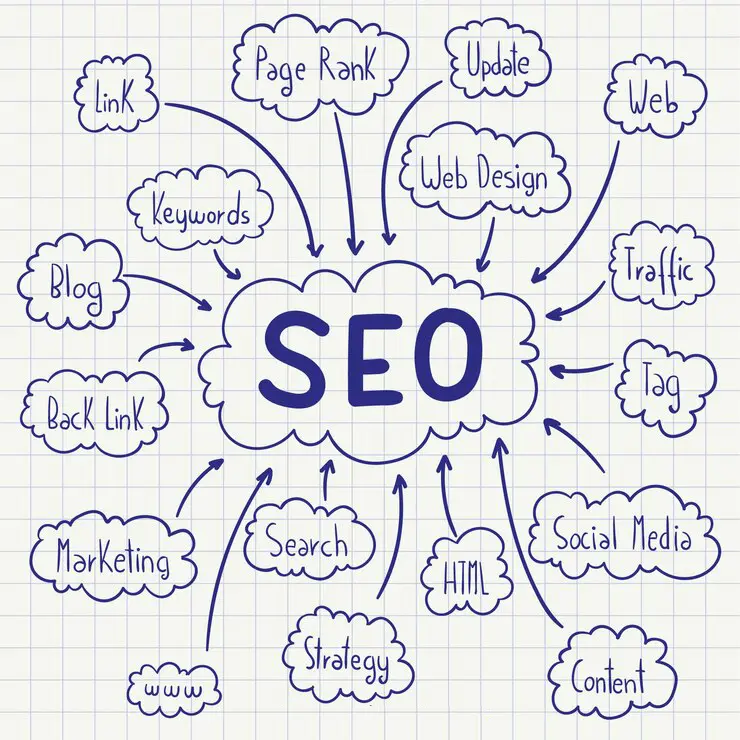
SEO Tools & Analytics Integration: A Comparison Between Blogs & Businesses Using WordPress
SEO Tools Bloggers Can Leverage On Their WordPress Sites
Bloggers aiming to optimise their posts for search engines have a plethora of tools at their disposal. WordPress provides seamless integration with various SEO plugins that can significantly enhance visibility and drive organic traffic.
Key SEO Plugins for Bloggers:
- Yoast SEO: One of the most popular plugins, Yoast SEO offers comprehensive features like keyword optimisation, readability analysis, and meta tag management. It also provides suggestions to improve content structure and internal linking.
- All in One SEO Pack: This plugin is beginner-friendly yet powerful. It supports XML sitemap generation, social media integration, and Google Analytics tracking. Its advanced settings cater to both novice and experienced users.
- Rank Math: Known for its user-friendly interface, Rank Math includes features like automated image SEO, detailed content analysis, and rich snippet support. It also integrates Google Search Console directly into the WordPress dashboard.
- Smart Crawl: This plugin helps boost your site’s visibility by offering one-click setup, automatic sitemaps, and real-time keyword suggestions. Smart Crawl also includes advanced features like customisable meta tags and automated link sharing for social media platforms.
Advanced Keyword Research Tools:
To effectively optimise your blog’s content, understanding how to conduct keyword research is essential. Here are some tools that can assist:
- Google Keyword Planner: Essential for identifying relevant keywords with high search volume and low competition.
- Semrush: Offers in-depth keyword research along with competitor analysis, backlink audit, and position tracking.
Content Optimisation Techniques:
- Optimising Meta Descriptions & Titles: Craft compelling meta descriptions and titles to improve click-through rates from search engine results pages (SERPs).
- Internal Linking Strategy: Enhance site navigation and user experience by linking related blog posts.
- Image Alt Text Optimization: Ensure all images have descriptive alt texts to enhance accessibility and SEO.
Tracking Performance:
Utilising tools like Google Analytics helps bloggers monitor key metrics such as page views, average session duration, bounce rate, and user demographics. Integrating these insights allows for data-driven decisions to refine content strategy.
Analytical Approach Businesses Should Adopt When Using Google Analytics With Their WordPress Pages
Businesses leveraging WordPress for their corporate websites need a robust analytical framework to track performance metrics effectively. Google Analytics serves as a cornerstone tool in this process.
Setting Up Goals and Funnels:
- Define specific goals such as lead form submissions, product purchases or newsletter sign-ups.
- Configure funnels to visualise the customer journey from initial visit to conversion.
E-commerce Tracking:
For businesses using WooCommerce:
- Enable Enhanced E-commerce Tracking within Google Analytics to gain insights into product performance, transaction details, and customer behaviour.
- Analyse metrics like average order value (AOV), conversion rate, and cart abandonment rate.
Custom Dashboards & Reports:
Create custom dashboards tailored to business objectives:
- Track key performance indicators (KPIs) such as website traffic sources, user engagement levels, and revenue generated from different channels.
- Set up automated reports to receive regular updates on critical metrics.
User Behaviour Analysis:
Utilise features like:
- Heatmaps (via tools like HotJar): Visualise how users interact with the site’s layout.
- Session Recordings: Understand user navigation patterns and identify potential UX issues.
Combining these analytical insights with the power of SEO tools equips businesses with the ability to refine their strategies continually.
Analytical Approach Businesses Should Adopt When Using Google Analytics With Their WordPress Pages
Google Analytics, particularly the latest version Google Analytics 4, is an invaluable tool for businesses aiming to optimise their WordPress sites. By meticulously tracking user behaviour, companies can refine lead generation strategies and bolster sales conversion rates.
Key Metrics to Monitor:
1. User Behaviour. Understand how visitors interact with your site by analysing metrics such as:
- Bounce Rate: Indicates the percentage of visitors who leave after viewing just one page.
- Average Session Duration: Measures the average time a visitor spends on your site.
- Pages per Session: Shows the average number of pages viewed during a session.
2. Traffic Sources. Identify where your traffic is coming from:
- Organic Search: Visitors who find your site via search engines.
- Direct Traffic: Users who enter your URL directly.
- Referral Traffic: Visitors coming from other websites.
- Conversion Tracking: Set up goals in Google Analytics to monitor successful actions such as form submissions, product purchases, or newsletter sign-ups.
- Use e-commerce tracking to gain insights into transaction data and revenue generated.
Advanced Techniques:
- Create tailored dashboards for quick access to crucial data points.
- Monitor specific user interactions like button clicks or video plays.
- Experiment with different versions of pages to determine which layout or content performs better.
Integration with SEO Tools:
Combine Google Analytics with SEO tools like Yoast SEO to track and improve search engine rankings. Analysing keyword performance and on-page SEO metrics can significantly enhance visibility and attract more organic traffic.
Additionally, leveraging Google’s Performance Max for online advertising can help businesses achieve greater recognition and reach.
By leveraging these analytical tools and online advertising strategies, businesses can create data-driven strategies that align closely with their marketing goals, ensuring sustained growth and customer engagement.

Conclusion: Choosing The Right Approach Based On Individual Needs And Goals
Understanding the differences in using WordPress as a blogger vs entrepreneur is vital for success. Bloggers benefit from:
- Flexible content creation
- Audience engagement tools
- Monetization options like ads and affiliate marketing
Entrepreneurs, on the other hand, leverage:
- Customizable themes for branding
- E-commerce capabilities with WooCommerce
- Advanced analytics and security measures
For entrepreneurs, integrating PR & media relations can further enhance their online presence and brand visibility. Assess your goals and choose features that match your needs. WordPress offers versatile solutions for both bloggers and businesses, ensuring you achieve your online objectives confidently.
FAQs
What is WordPress and how is it used for blogging and business?
WordPress is a versatile content management system (CMS) that powers a significant portion of the internet. It supports both blogging and business purposes, allowing users to create unique and functional websites through customisable themes and plugins.
What are the key differences between using WordPress for blogging versus running a business website?
The primary objectives differ; blogging focuses on sharing information and audience engagement, while business websites aim for lead generation and sales conversion. Additionally, customisation options, monetisation strategies, and audience engagement techniques vary significantly between the two.
What customisation options are available on WordPress for blogs and businesses?
WordPress offers various customisation choices, including custom themes tailored for branding in business websites compared to simpler designs for personal blogs. Plugins also enhance functionality, allowing users to adapt their sites to specific needs.
How do monetisation strategies differ between blogs and businesses on WordPress?
Bloggers often utilise ad networks and affiliate marketing for monetisation, while businesses may integrate e-commerce solutions like WooCommerce. Each approach reflects the distinct goals of engaging audiences versus driving sales.
What security measures should be considered for WordPress blogs versus business websites?
While both types of sites require basic security measures against common threats, business websites necessitate comprehensive protocols to protect sensitive customer data and ensure uninterrupted operations. Security is crucial regardless of the site’s purpose.
How can SEO tools and analytics be effectively used on WordPress sites?
Bloggers can leverage various SEO tools to optimise their posts, while businesses should adopt analytical approaches using Google Analytics to track lead generation efforts. Both strategies aim to enhance visibility and measure success online.